Showing posts with label voip. Show all posts

Need a home phone? You need this.


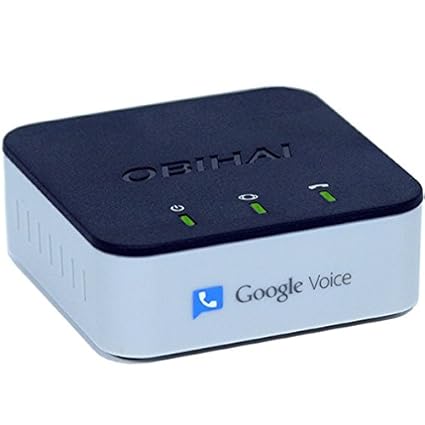
This little box plugs into your internet router. Then you plug your regular old (land line) telephone into it. Then you have free phone service over your internet connection. Don't pay Comcast or somebody else for phone service! The only caveats here are, you have to set up a Google Voice account (which isn't hard), and if you want 911 to work you pay something like $15/year. It's still stupid cheap, and Google Voice is pretty slick.

My wife and I have used Google Voice for years, and we have an older version of one of these boxes, powering our home phone (which exists only to answer intercom calls). It works great!

After we first moved into our new place, we got a landline phone, because she needed one for radio interviews. But it was like $28/month for something we used for about 60 minutes each month. It's just crazy to pay that. So I dug out and reconnected our Google Voice phone instead.

Google Voice for your Building Intercom

This Apartment Therapy post has a pretty good and simple overview of how you can use your Google Voice # as the number you give your landlord or condo association for your entry in the security phone system. We've never actually had a landline, so we used this for our front door buzzer solution for a good long while.

Why not take it to the next level, though? Instead of having our cell phones ring when somebody buzzes our front door, why don't we fake it to the max and pretend we have a home phone? Back in August, we bought this thing -- an Obihai OBi 100 VoIP Telephone Adapter. What does it do? It connects Google Voice to old school wired telephones. If you've ever know anyone who has Vonage, this is the same kind of deal. A landline phone plugs into this box. You also connect the box to the internet. Log in and enter your Google Voice username and password and boom, you've got a fake landline. Pick up the phone, get a dialtone, dial it like normal, and everything seems to work.

Now when somebody buzzes us from the front gate, our actual landline telephone rings. And when we miss somebody's buzz, we get an email from GV saying "Missed Call from Front Gate." It works pretty slick. We've actually got it connected to one of those cordless phone systems that has multiple handsets, so it gives us a landline phone both upstairs and downstairs.

D-Link DPH-50U Skype Adapter

What does the D-Link DPH-50U do? Well, it lets you hook a regular telephone to your computer. Why would you do that? To use Skype, of course. If you don't already know about Skype, it's time to learn. Skype is an insanely neat telephone replacement software for your computer. If you and your friends all have Skype, calls between each other are free. You could be in Tokyo, your friend could be in Iowa, it's still free. I love it. I've been encouraging friends to get Skype accounts left and right.

Both my home and office phones are actually Skype accounts. To make them work with real phones, we use SkypeIn (buying a phone number) and SkypeOut/SkypeUnlimited (calling regular phones). If you want to be able to receive calls from ordinary phones, you buy a SkypeIn number. In any area code you want, or even in any country they have support for. Then inbound calls to you at that number are free. As far as making calls, you can either pay per minute (about 2.5 cents per minute in the US, I believe), or you can do SkypeUnlimited, which lets you call anywhere in the US and Canada with no long distance charges. That's what I do -- I got it for some amazingly cheap price as a starter deal. But even at the "full" price of $29.95/year, that's still an amazing deal.

The adapter isn't necessary to use Skype. You can use a normal computer microphone and headset. If you have a laptop with a microphone and speakers built in, Skype will work like a speaker phone (which comes in handy for meetings at work). There are also various cordless and corded USB telephone handsets available (I'm quite fond of the IPEVO Free-1). But with this adapter, you can talk on Skype over a normal phone, and even use it to dial out (if calling a regular phone).

If you have an incoming call (from another Skype user or from a phone), the thing makes your phone ring. The inbound caller ID works as you'd expect, unless you get a call from another Skype user -- then the caller ID actually shows their user name. Pretty neat.

There's only a couple oddities about dialing this thing that make me wonder, what were they thinking? (Or that it wasn't designed in the US.)
  • You need to dial 001 + (area code) + (phone number) + *. I assume 001 means US, then the area code and number are expected, but then you have to hit the asterisk. I know from a programming perspective, it would be very easy to set a "default" country, so you wouldn't have to dial the 001.
  • And why do you have to tell it you're done dialing by hitting star? Can't it figure it out, say, if you've stopped hitting numbers for 2-3 seconds, then connect the call? Seems to be a no brainer.
  • Out of the box, the thing plays a special information tone when connecting your call. You know, the three beeps you hear before a recorded voice tells you that you call cannot be completed? That's how the device tells you it's working. Very strange. Thankfully, upgrading the driver to the latest version (1.1 as of this writing) seems to address this.
These aren't deal breakers for me, but if you have somebody in your home or office who isn't tech savvy, these little quirks are going to confuse the heck out of them.

Even with all of that, it's still pretty neat to be able to plug in a normal telephone. We'd been having problems with our previous Skype phone (not the IPEVO one) at home, so today we wandered down the street to our local neighborhood Radio Shack and picked up a cordless phone with two handsets to use as our new Skype-based home phone setup. Took only a few minutes to set up, and so far, it's working great.

Skype + IPEVO Free-1 USB Skype Handset

I admit it. I'm a Skype geek.


Even though Skype is no longer free, it's still the best deal in town. For only about fifty bucks a year, you get unlimited inbound and outbound phone calls in the US and Canada. Skype still feels a bit “in beta” sometimes – there's no outbound caller ID, and sound quality suffers as your net connection suffers, but these are bugs that'll get worked out eventually. And, it couldn't be any more convenient. Plug a headset into your laptop, whether you're in Topeka or Tanzania, and calls to your local (home) phone number ring through to you.


Not to mention, if you work in technology, and/or have cool friends, you'll be able to convince other people to sign up for Skype, too. Then you can call each other completely outside of the telephone network, and talk completely for free, even if neither party is signed up for a Skype In or Skype Out phone plan.


It makes my laptop into the world's largest cell phone that works anywhere you've got wifi (or wireless broadband). I travel all the time, and it's great to be able to hop on at a Starbucks or in my hotel room and take care of all of my calling needs without using up cell phone minutes. And when I'm working from home, it's my business phone. Let's face it, in this modern age, who has a land line any more? I sure don't. And I'm not so good with keeping track of my cell usage. I seem to run over every couple of months. So, to get around that, I use Skype as often as possible.


But, for casual calling, a headset is annoying. It uses up your headset port and microphone port. Not a big deal with the microphone, but for the headset, it blocks your speakers, making it tough to listen to iTunes or soma fm while you're waiting for a phone call.


IPEVO FREE-1 USB Handset


That's where the IPEVO Free-1 USB Handset for Skype comes in. I've had this for a few months now, and it works really well. Load the driver, plug it into a USB port, and suddenly it's not Skype – it's just a phone. Pick it up, dial a number, hit go, and away you go. Hit the Skype menu button, and up pops a list of your contacts for you to scroll through. Hit dial and the call is connected.


When I first got it I was afraid it'd seem cheesy and too lightweight for every day use. I was wrong. The thing looks small, but it's big enough to be comfortably balanced in your hand. It sits face up or face down when not in use. The microphone is at the far bottom, just past a bit of open space. This is supposedly to help reduce echo when talking. I'm not sure if it actually has any affect, but the sound quality is great. People come through loud and clear, and people can hear me just fine.


The best feature about this is that you can configure Skype, and your Sounds control panel, so that Skype will always use the handset, and other apps will always use the computer's normal speaker and microphone ports. That way I can have my speakers connected to my desktop's line out connection, but still have Skype up and running, without any interference.


I've only got a couple of peeves with the handset. One, when the phone rings, the ringer isn't quite loud enough. If you're in the same room as the phone, it's fine. But, if you're three rooms away and have the stereo on, you're never going to hear it ring. Second, there's no headphone plug. Just about every cell phone and cordless phone has one of those little mini-plug ports to plug in a hands free headset. Why doesn't this device have one? Still, these are minor quibbles, and overall, I'm very satisfied with it.